EmailXport OST to PST Converter
All-in-one OST to PST converter tool that allows you to recover Exchange data to PST when the OST file becomes inaccessible due to events like an abrupt system crash. It deeply scans the disconnected OST file, recreates each folder and email with original metadata, and saves mailbox items into PST and other popular formats.
- Convert single or multiple OST files without Outlook and file size restrictions.
- Smart filters like date range, skip empty folders, etc., for precise results.
- Secure data encryption to safeguard user’s information during conversion.
- Get a detailed preview of OST emails along with all the attachments intact.
- Manage the resultant PST files efficiently with Split Option.
- Extract contacts (.vcf) and calendars (.ics) from OST and save them in PST.
- Search specific email based on multiple criteria like From, To, CC, BCC, etc.
- Compatible with all versions of Windows, Mac, and Outlook.
What is EmailXport OST to PST Converter tool?
The EmailXport OST to PST Converter tool is a high-volume optimization tool that makes the conversion simple. Loaded with multiple advanced features, it automates the entire process with no downtime.
Smart Filtering Options
With this brilliant tool, you get multiple smart filters to customize your data conversion as per your requirements:
- Date Filter: Select From and To dates to save data from specific time interval.
- Item Type Filter: Choose what you want to save between Email, Journal, Tasks, etc.
- Exclude Deleted Folder Items: Skip saving deleted folder items in the destination file.
- Exclude Empty Folders: Let go of all unnecessary space occupied by the empty folders.
- File Naming Convention: Save output file with desired name for better accessibility.
Multiple Secure Formats
The OST file to PST Converter tool offers multiple saving file formats other than PST file, such as:
- EML: Save important emails with attachments for cross-platform accessibility.
- MSG: Easily save essential information in MSG and share with others.
- PDF: Improve readability by converting Outlook mailbox data to PDF.
- DOC or DOCX: Easily access, share, and print emails without requiring Outlook profile.
- HTML or MHTML: Save your email in formats that can be read on any web browser.
Manual vs EmailXport: See the Difference
When it comes to converting OST to PST file, there are two methods available: Outlook’s Import/Export feature and professional solution. Know the difference between both and choose the best one as per your needs:
| Features | Outlook’s Import/Export method | EmailXport OST to PST Converter |
|---|---|---|
| Converts offline OST files | ✓ | ✓ |
| Transfers contacts, calendars, and attachments | ✓ | ✓ |
| Selective folder conversion | ✓ | ✓ |
| Convert corrupted or damaged OST files | ✗ | ✓ |
| Handles large or oversized OST conversion | ✗ | ✓ |
| Folder hierarchy retention like metadata, structure, and formatting | ✗ | ✓ |
| Bulk OST to PST file conversion | ✗ | ✓ |
| Convert OST files without having an active account linked with the OST | ✗ | ✓ |
Why Choose EmailXport OST to PST Converter Software
Find out the top reasons why exporting OST to PST files with our tool can safeguard your data:

Secure data backup
PST files are the safest format when it comes to taking a backup of entire OST mailbox data. During downtime of the Exchange server or maintenance issues, only a backup copy proves to be helpful.

Data consolidation and security
Easily consolidate data from multiple OST files into a single PST file for easier management and backup. Moreover, you can provide secure data encryption to keep the OST mailbox data locked.

Convert OST to PST without Outlook
Manual conversion requires Outlook application to convert OST to PST file. But this is an independent software that runs without installing any additional applications on your system, including Outlook.

Convert Orphaned OST Files
Easily export data from orphaned OST files into PST format even when the original Exchange profile is unavailable. Keep emails, contacts, calendars, attachments, and folder hierarchy intact for easy mailbox recover and long-term access.
EmailXport OST to PST Converter Software Features
Check out the core features of the OST to PST file converter tool and make your file conversion journey hassle-free.

Bulk OST file data conversion in PST
Efficiently add bulk OST files and convert them without Outlook in PST format. The tool supports all types of OST files whether corrupted or inaccessible, saving data in an easily accessible and secure format.

Recover permanently deleted data
Recover accidentally or permanently deleted emails and other OST mailbox data in original format and structure. Get back all your essential data in a PST file, which you can later use in Outlook.

Powerful filters for selective conversion
Loaded with multiple top-quality features and filters, this OST to PST software makes the entire process easy. Utilize filters for selective and precise data conversion from the OST file to PST.

Manage oversized OST mailbox
High-volume optimization of large or oversized mailbox data into multiple smaller, more manageable PST files. Use the split option wisely and save all the data on local system or an external drive.

Save log report of conversion process
Generate a detailed log report of the OST to PST conversion process and keep a track of everything with it. Make sure all the Outlook OST mailbox data gets converted seamlessly into a PST file without any data alteration.

Free convert OST to PST tool version
The OST to PST converter free software offers a free version with centralized dashboard to resolve all issues and convert OST mailbox easily. You can test the tool and later purchase the license. It is a one-time investment, and you are good to go.
Convert OST to PST in 3 Simple Steps
Follow a simple step-by-step process to convert OST files to PST within minutes:
Compare Features: Free Trial vs. Licensed Version
| Features | Free Trial | Licensed Version |
|---|---|---|
| Supports bulk OST conversion | ✓ | ✓ |
| Supports inaccessible or corrupted OST files | ✓ | ✓ |
| Unique filter options for precise conversion | ✓ | ✓ |
| Allows to split resultant PST file into multiple parts | ✓ | ✓ |
| Supports OST files of all major Outlook versions | ✓ | ✓ |
| Compatible with all Windows OS | ✓ | ✓ |
| Unlimited OST data conversion | 10 items per folder only | No Limitation |
| DIY | Download Now 100% Secure | Buy Now $49 30 Days Moneyback |
FAQs of OST to PST file Converter tool
Get answers to all your questions regarding OST to PST file converter tool:
A. Here’s the step-by-step process to easily convert your OST files into PST format:
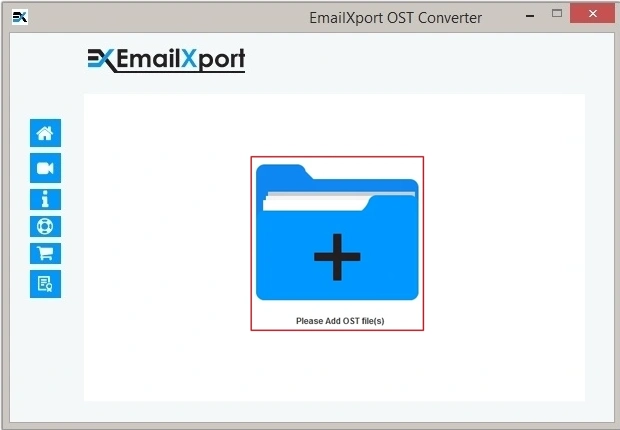
Step 1: Open the software and click on the “+” icon to add OST files.
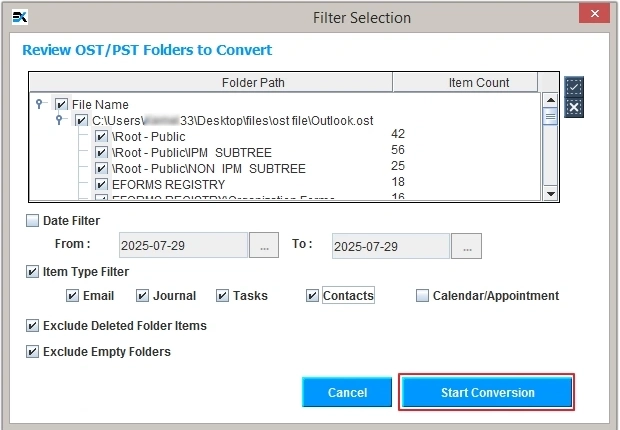
Step 2: Select required OST file, click Open, and tap on Set Filter and Convert.
Step 3: Review OST folders, apply filters, and click Start Conversion.
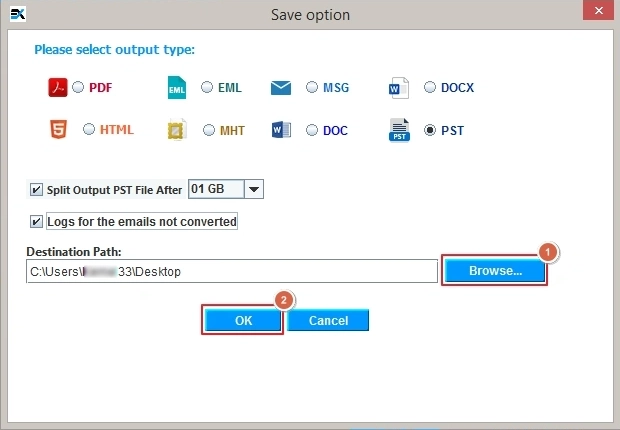
Step 4: Select PST as output, Browse saving location, and click OK to proceed.
Step 5: The software will start converting files. Once completed, click OK.
A. No, the EmailXport OST to PST Converter allows conversion of single or multiple OST files with zero file size restrictions.
A. Yes, you can easily preview all your OST data before the final conversion and verify the data to assure 100% accuracy in conversion.
A. Yes, you can directly extract email attachments from the OST mailbox and save them in your desired folder.
A. The tool is fully safe to use as it protects your data via employing AES 256-bit encryption standards during conversion.
A. When you face such an error, you might have corrupted OST files but this tool is capable enough to convert corrupted or inaccessible OST files to your preferred format.
A. Yes. For selective conversion, the utility offers data and date-based filters that help with quicker and distinct conversion.
A. The tool offers split-wise conversion that lets you convert your large OST files and split them in different sizes as per your convenience.
A. To access orphaned OST files without Exchange or Outlook, use the EmailXport OST to PST Converter for easy access with zero hassle.
A. Yes, the OST to PST converter free software comes with a demo version to test the features without paying anything.
Reviews from Our Happy Clients
Read what industry expert and our happy customers say about our EmailXport OST Converter tool.
I wanted to convert my 10 years old OST file which is not in accessible condition now. After searching a lot, I came across this OST tool. The interface was so simple, and the process was also so smooth.❞
As a non-tech person, I found this tool easy to use. It converted my files in minutes. I contacted the support team to get a clear view of the tool, and they made sure all my doubts are gone. Thanks!❞
I have used several converter tools, but EmailXport OST to PST Converter fits my needs the best. It handled my corrupted OST file easily and converted it to PST. The support team is also very responsive. ❞
I was worried about data loss, but this OST to PST tool converted my data without any issues. I had no issues using this the software. It is definitely a time-saver. I have recommended it to my team.❞
I am extremely satisfied with EmailXport OST to PST Converter tool. it’s a great tool for recovering damaged files data in minutes. It worked perfectly as I was expecting. Highly recommended tool.❞
I needed to convert several OST files to PST, and EmailXport did it flawlessly. I converted almost 10 OST files with it, and it did a great job by saving my tons of time. Impressive performance.❞
EmailXport OST to PST Converter Software Specification
Download the free trial version to know how to convert OST files without data loss.
Software Download
Size : 212.0 MB / Version : 25.2
Size : 170.0 MB / Version : 25.2
Trial Limitations
The trial version allows you to convert 10 items per folder.
System Specifications
Hard Disk Space
1 GB of free hard disk space
RAM
Minimum 4 GB RAM
Processor
Intel® Core™ 2 Duo CPU E4600 @ 2.40GHz 2.39GHz Processor
Pre-Requisites
- Microsoft .NET framework 4.5 or above should be installed.
- If you are using Windows 11, 10, 8, 7, then launch the tool as "Run as Administrator".
Supported Editions
- Microsoft Windows – Windows OS 11 (64 bit), 10, 8, 7 (32 bit or 64 bit) & Windows Server 2019, 2016, 2012 R2, 2008
- Mac OS - OS X Mountain Lion(10.8), OS X Mavericks(10.9), OS X Yosemite(10.10), OS X El Capitan(10.11), macOS Sierra(10.12), macOS High Sierra(10.13), OS X Mojave(10.14)
Electronic Delivery
Get the automated download link of the tool and activation key via email in 15 minutes.