EmailXport Mac MBOX Converter

An advanced MBOX Converter for Mac to easily convert bulk MBOX mailbox data, including all attachments and metadata, into 8+ file formats with complete integrity. Experience smooth and selective data conversion with innovative filtering options for better management of emails.
- Add the MBOX folder containing multiple files and sub-folders in a single conversion cycle.
- Supports MBOX files from more than 20+ email clients, including Apple Mail, Thunderbird, etc.
- Allows you to add large MBOX files easily without imposing any restrictions.
- Converts and saves all the MBOX data in the original structure, formatting, and hierarchy.
- Offers multiple saving formats, including PST, PDF, HTML, DOC, MHT, EML, MSG, etc.
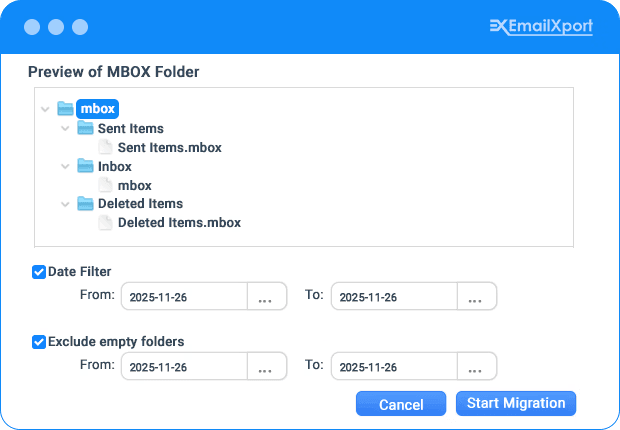
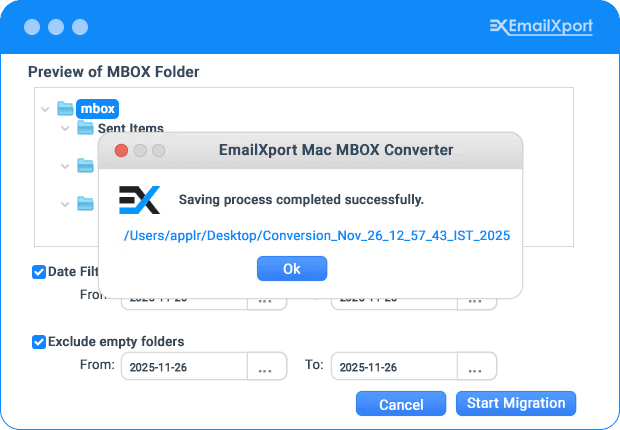
- Exclude empty folders and date filters for precise MBOX emails and attachments conversion.
- Manage oversized MBOX files efficiently by splitting them into multiple smaller parts.
Best Features of Our Mac MBOX Converter Tool
Check out all the top features offered by our powerful Mac MBOX Converter software.

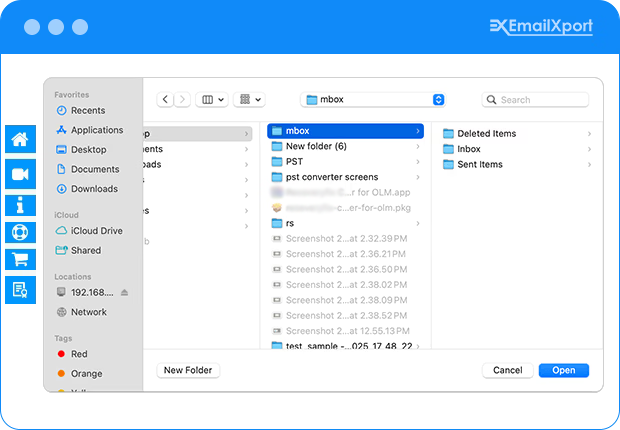
Add the MBOX folder with sub-folders
The EmailXport Mac MBOX Converter tool allows you to add entire MBOX folders with subfolders without any issues. This enables you to selectively import specific folders or whole MBOX emails, ensuring a error-free conversion of your emails.

Multiple flexible saving formats
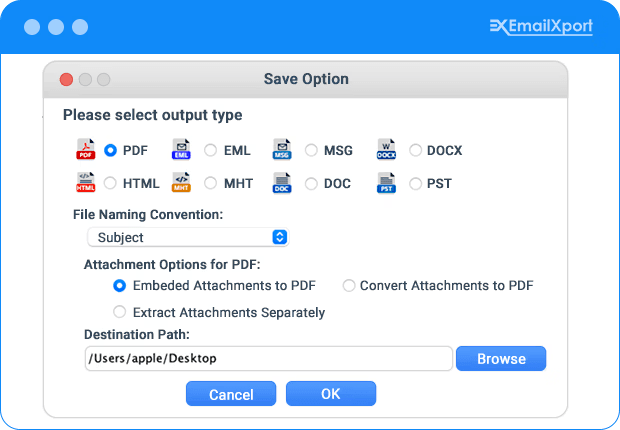
The tool offers multiple flexible saving file formats, allowing you to convert Mac MBOX files to PDF, HTML, PST, EML, MSG, DOC, and many more formats. It makes sure your email data is accessible and usable across different platforms whenever needed.

Convert Mac MBOX files in bulk
The batch conversion feature is ideal for large-scale email conversion, backups, or data archiving, making it a powerful and efficient solution for Mac users. Select multiple/bulk Mac MBOX files, choose the saving formats, and let the tool handle the rest.

Smart filters for accurate conversion
With the smart filters offered by this tool, you can easily handle specific emails, attachments, and other metadata, minimizing human errors and corruption. It assures that your emails are converted correctly, with all their original details intact.

Keep original folder hierarchy intact
Ensure that the original folder hierarchy, email folders, and sub-folders are organized as the original MBOX file during the conversion process. Perform a smooth transition and easy access to your emails without disruptions to your existing folder structure.

Offers direct access to saved files
The MBOX Converter for Mac tool provides direct access to the saved files, allowing you to instantly view and verify your converted emails without needing to look for them manually. This makes it simple to search, review, and manage your converted data.

Compatible with all macOS versions
The Mac MBOX Converter software is compatible with all major macOS, including macOS Tahoe, macOS 15, 14, 13, 12, 11, 10.15, 10.14, 10.13, 10.12, OS X 10.11, 10.10, 10.9, 10.8, Mac OS X 10.7, 10.6, and older versions, making it accessible across all devices.

Free Mac MBOX Converter
The EmailXport Mac MBOX Converter software offers a free demo version that you can download and try before purchasing. Experience the tool features and functionality by converting 25 items per MBOX folder to the desired format, ensuring it meets your needs.
How does EmailXport Mac MBOX Converter work?
Follow the easy steps to quickly convert Mac MBOX files into the required format with 100% accuracy:
Free and Licensed Version Comparison
Compare the features offered by the Mac MBOX Converter free and full versions for a hassle-free email conversion.
| Features | Free Trial | Full Version |
|---|---|---|
| Supports adding an entire MBOX folder | ✓ | ✓ |
| Smart filters for precise conversion | ✓ | ✓ |
| Compatible with 20+ MBOX email clients | ✓ | ✓ |
| Offers multiple saving file formats | ✓ | ✓ |
| Split the output PST file into smaller parts | ✓ | ✓ |
| 100% accurate and error-free results | ✓ | ✓ |
| Unlimited Mac MBOX data conversion | 25 items per MBOX folder | No Limitations |
| DIY | Download Now 100% Secure | Purchases Now 30 Days Moneyback |
EmailXport Mac MBOX Converter Tool FAQs
Still have doubts regarding the Mac MBOX Converter tool? Go through the FAQs section below and resolve all your queries.
A. Here are the steps to convert Mac MBOX files using the feature-rich Mac MBOX Converter software:
Step 1: Download, install, and launch the Mac MBOX Converter software.
Step 2: Click on the + Please Add MBOX File(s) button to add the entire MBOX folder.
Step 3: Once added, apply filters and click on the Start Migration button.
Step 4: Select the desired saving format and apply additional filters for selective conversion.
Step 5: Click on the Browse button to define the saving location and click OK.
Step 6: The tool will start converting the Mac MBOX files data and shortly save it at the defined location.
A. Yes, you can easily convert bulk MBOX emails using this MBOX converter for Mac software in a single conversion cycle.
A. No, you do not need to install additional applications to use this software on your Mac device.
A. Yes, you can easily save attachments separately using the best MBOX Migrator for Mac tool.
A. Yes, you can install this Mac MBOX Converter software on macOS Sierra (10.12) without any difficulties.
Mac MBOX Converter Software Specification
Software Download
Size : 193.0 MB / Version : 25.2
Size : 224.0 MB / Version : 25.2
Trial Limitations
The trial version allows to save 25 items per folder.
System Specifications
Hard Disk Space
1 GB of free hard disk space
RAM
Minimum 4 GB RAM
Processor
Intel® Core™ 2 Duo CPU E4600 @ 2.40GHz 2.39GHz Processor
Pre-Requisites
- Microsoft .NET framework 4.5 or above should be installed.
- If you are using Windows 11, 10, 8, 7, then launch the tool as "Run as Administrator".
Supported Editions
- Mac OS - OS X Mountain Lion(10.8), OS X Mavericks(10.9), OS X Yosemite(10.10), OS X El Capitan(10.11), macOS Sierra(10.12), macOS High Sierra(10.13), OS X Mojave(10.14)
- Microsoft Windows – Windows OS 11 (64 bit), 10, 8, 7 (32 bit or 64 bit) & Windows Server 2019, 2016, 2012 R2, 2008
Electronic Delivery
Get the automated download link of the tool and activation key via email in 15 minutes.