EmailXport Mailbox Migration Wizard

Download our mailbox migrator utility to smoothly manage all your mailbox migration needs between IMAP and cloud servers. Moreover, the tool also provides users with the ease to migrate offline files to Office 365 environment for enhanced accessibility.
- Execute easy transfer of data from between different IMAP servers, including Gmail, Yahoo, GoDaddy, etc.
- Directly migrate mailbox to Office 365 tenant from GoDaddy, Gmail, Zoho Mail, and Webmail.
- Migrate OST, PST, EML, and MSG files to Office 365 with complete accuracy.
- Migrate mailboxes with the metadata, such as From, To, CC, BCC, Subject, Body, etc.
- Run multiple migration instances at once and batch migration for quick data transfers.
- Migrate mailbox to Office 365 accurately with the UNICODE character support.
- Migrate according to convenience using the Schedule or Immediate Execute options.
- Supports precise and controlled migration of mailboxes with the advanced data filters.
- Eliminate duplicity from the destination data using the Incremental migration feature.
- Secure migration of user mailboxes with the integrated modern Graph API architecture.
Why Enterprises Choose us for Mailbox Migration?
Migrating mailboxes using our software comes with benefits that paves the way for an error-free migration.

Automate Mailbox Migration
Easily migrate all your emails and folders instantly or schedule it at the time of your choice with minimal manual effort.

Large Scale Migrations
No need to worry about large-scale migrations, as our tool allows you to create different migration jobs in parallel to easily move bulk data.

Free Trial Available
Download a free demo version of the software to evaluate its advanced features with limited mailbox migration capabilities.

Easy to Use Interface
Provides a user-friendly GUI with easy navigation options to handle mailbox migration between platforms without hassle.
Supported Source and Destination
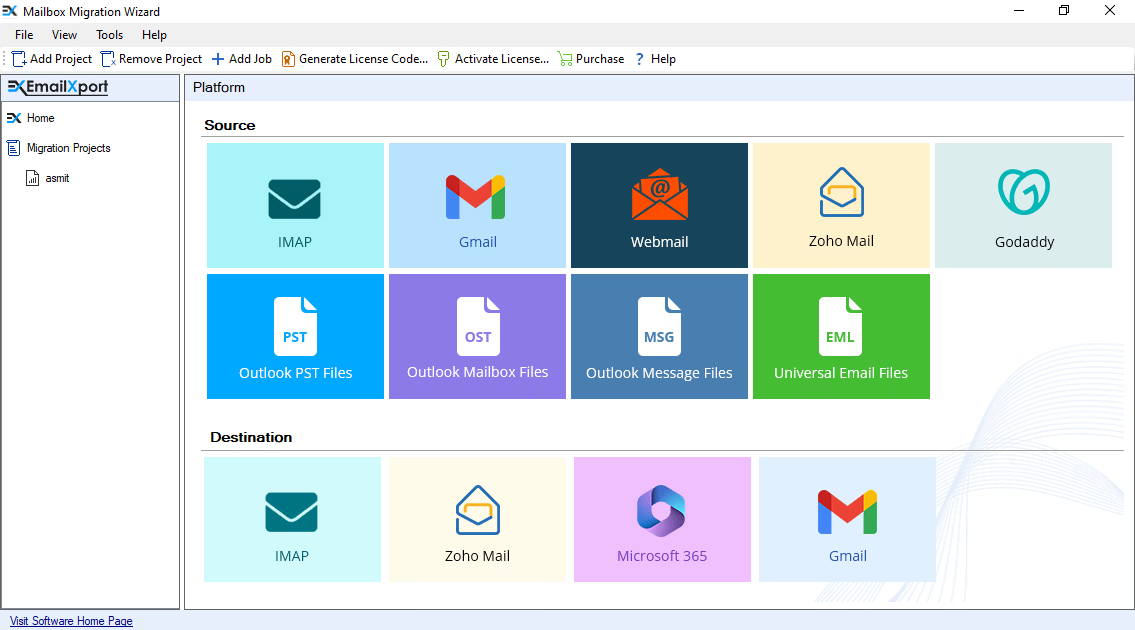
Use the mailbox migrator to migrate mailboxes from different source, destination email clients and server to transfer the data without any data loss.
| Supported Source | Supported Destination |
|---|---|
| OST/ PST/ MSG/ EML | Office 365 |
| IMAP | Office 365 |
| IMAP | IMAP |
| WebMail/ Gmail | Office 365 |
| Gmail | Zoho |
| Zoho | Office 365 |
| Zoho | Gmail |
| GoDaddy | Office 365 |
Prime Features of Mailbox Migration Tool
Scroll down to discover the top features supported by the migration solution to smoothly migrate a mailbox to Office 365.

Consolidated migration platform
All-in-one platform that consolidates multiple source and destination platforms within a single dashboard. Use the tool to migrate data from one IMAP email server to another, Zoho Mail, Gmail, and Webmail email services to Office 365.

Transfer between Gmail and Zoho
Perform two-way mailbox migration between Gmail and Zoho. Allows you to simply add Zoho and Gmail in both source and destination for easy migration of emails, contacts, attachments, calendars, and other data.

Migrate data files to Office 365
Migrate Outlook data files like OST and PST containing mailbox data or single email messages stored in MSG or EML files to Office 365. Use the tool to transfer mailbox data files directly to the cloud.

Add single/ multiple data files
Migrate mailbox to Office 365 from a single or multiple OST, PST, MSG, or EML data files. With this migration software, it’s easy to transfer mailboxes from an unlimited number of files without any size restrictions.

Easy user mapping
Supports simplified user mapping of source and destination. Use the search feature to find desired users from the list. Map users manually or upload a pre-mapped CSV file containing user details for automated mapping.

Migrate emails precisely
Use smart data filters to migrate only the required data from the mailboxes. Eliminate migrating the entire mailbox from the user account via easy folder selection and Include/exclude specific folders filter.

Filter data by date
Apply the date filter within the mailbox migration software to transfer mailboxes for a specific date range. Save your time with the date filter and selectively migrate mailbox to O365 rather than the entire mailbox.

Migrate bulk data
With support for bulk data migration, the tool allows easy transfer of unlimited mailboxes from the connected user accounts. Apart from this, it supports running multiple migration instances for quick transfer between clouds.

Migrate data with hierarchy
Run the mailbox migrator and retain the mailbox folder hierarchy within the destination cloud environment. Choose from the options to transfer data with or without hierarchy and save complete data in a separate folder.

Generate migration report
For detailed insights into the migration projects, the tool provides a clear and structured migration report with full details. The generated report includes fields like source folder, destination folder, total items, status, etc.
Detailed Comparison - Full Vs Demo Version
Grab a quick view on the side-by-side comparison of the free and full version of the mailbox migration tool.
| Features | Free Trial | Full Version |
|---|---|---|
| Transfer MSG and EML files | 50 items per folder | As per license |
| Migrate mailbox to O365 from OST and PST | 50 items per folder | As per license |
| Transfer emails from GoDaddy, Zoho, and IMAP server | 100 items per folder | As per license |
| Transfer data from Cloud and IMAP mailboxes | ✓ | ✓ |
| Migrate data selectively with item and date filter | ✓ | ✓ |
| Eliminate duplicate data from migration | ✓ | ✓ |
| Bulk transfer of data | ✓ | ✓ |
| Run on-demand and automated migrations | ✓ | ✓ |
| DIY | Download Now 100% Secure | Purchases Now 30 Days Moneyback |
FAQs of Mailbox Migration Tool
Still have doubts? Here are some of the frequently asked questions, along with their answers, about our mailbox migration tool.
A. Here are the steps to perform error-free migration of mailboxes using this tool:
Step 1: Install and launch the mailbox migrator on your PC and click on Add Job.
Step 2: Select migration type, enter the project name, job name, and click Next.
Step 3: From the top-left pane, click Add to select and connect the source and destination.
Step 4: Map the source and destination user mailboxes. Click Next.
Step 5: Select the mailbox folders and filters to perform selective transfer. Click Next.
Step 6: Choose to Execute Immediate or Schedule and click Finish to initiate migration.
A. Our tool is ranked on top as one of the best mailbox migration tools because of its wide support to a range of source and destination environments as mentioned below:
- Supported Sources: Offline data files like EML, MSG, PST, OST and Zoho, Gmail, GoDaddy, and other IMAP Servers.
- Supported Destinations: Gmail, Zoho Mail, Office 365, and other IMAP based email servers.
A. When you migrate mailbox to O365 using this tool between any of the supported email clients or servers, email, contacts, calendars, attachments, with the metadata is transferred. The tool helps you preserve timestamps, subject, sender or recipient details, and other metadata about the email data.
A. Yes, with the mailbox migrating tool, you can transfer bulk data without any size limitations. It effortlessly migrate large mailbox to Office 365 from offline data files and email servers. You can also schedule or run multiple migration jobs at once for quick transfers.
A. Yes, when you migrate mailboxes with our software, security and user data privacy is our top priority. Our tool uses advanced data loss prevention and multi-factor authentication to provide a reliable environment to migrate mailboxes with zero data loss.
A. Yes, with our tool, you can connect any IMAP server-based email platforms in the source and destination and transfer the data as required. Apart from this, the tool also supports efficient two-way migration of mailboxes between Gmail and Zoho Mail.
EmailXport Mailbox Migration Software Specification
Trial Limitations
The trial version allows to migrate 50 items per folder.
System Specifications
Hard Disk Space
1 GB of free hard disk space
RAM
Minimum 4 GB RAM
Processor
Intel® Core™ 2 Duo CPU E4600 @ 2.40GHz 2.39GHz Processor
Pre-Requisites
- Microsoft .NET framework 4.5 or above should be installed.
- If you are using Windows 11, 10, 8, 7, then launch the tool as "Run as Administrator".
Supported Editions
- Microsoft Windows – Windows OS 11 (64 bit), 10, 8, 7 (32 bit or 64 bit) & Windows Server 2019, 2016, 2012 R2, 2008
Electronic Delivery
Get the automated download link of the tool and activation key via email in 15 minutes.