Thunderbird is an open-source email client, preferred by many users due to its advanced features and simple interface. However, its limitations make it challenging for users to access and share emails across different platforms and devices.
The best way to easily access all the emails is to convert Thunderbird email to PDF format. Whether you are looking to convert a single email or want to convert the entire mailbox, this guide has got you covered. First, let’s know why we need to convert Thunderbird to PDF.
Why do we need to convert Thunderbird to PDF?
There are multiple reasons to convert Thunderbird to PDF. Here is a list of some common ones:
- PDFs preserve emails in original formatting and structure.
- Users can easily access PDF files anywhere and anytime.
- Easily password-protect your PDF files for enhanced security.
- Access PDF files without needing an internet connection.
- Create a secure backup without data breach or theft issues.
- Reduce Thunderbird’s storage space by converting emails to PDF.
- Quickly manage and organize your emails systematically.
Convert Thunderbird Email to PDF manually
Thunderbird offers two different methods to convert emails into PDF format. Follow the procedure below for guaranteed results. Before proceeding with the methods, make sure to have a Thunderbird email backup for additional security.
Method 1. Convert Thunderbird Email to PDF (Single Email)
Thunderbird offers a print option, by which you can convert Thunderbird email to PDF. Here are the steps to do it:
Step 1. Open Thunderbird and select the required email you want to convert. Then right-click on it and choose the Print option.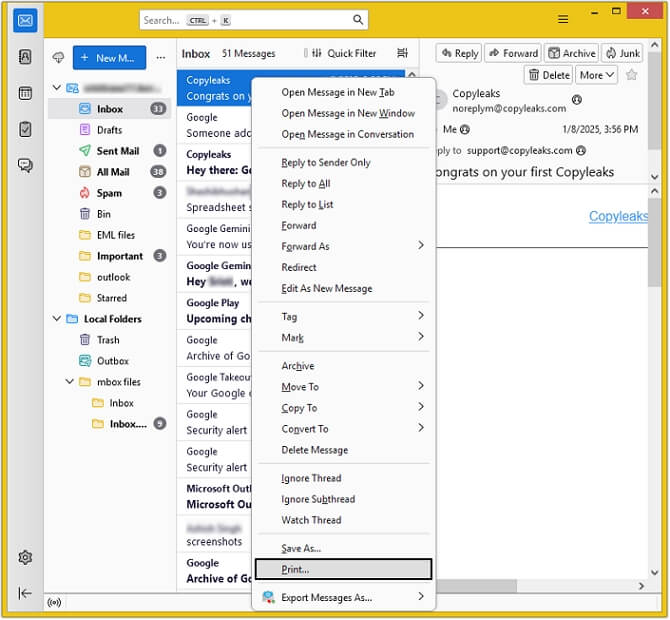
Step 2. In Destination, select Save to PDF from the drop-down menu and click on the Save button.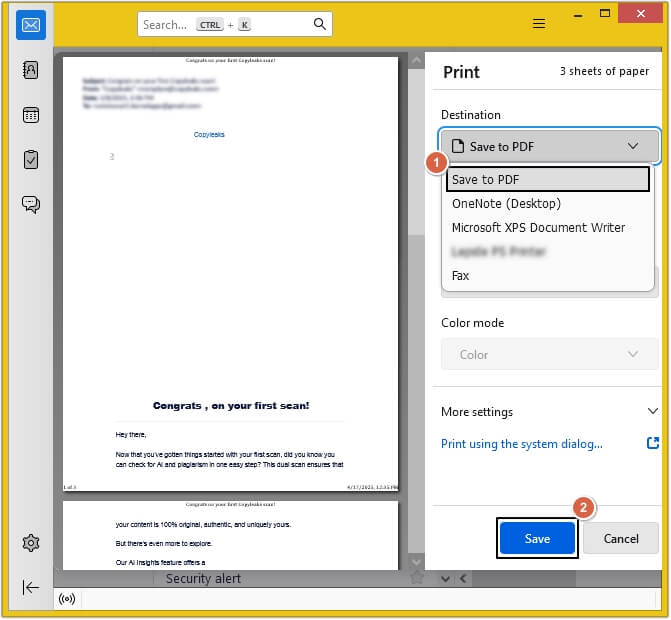
Step 3. Browse the saving destination, then provide a name to the file and click Save.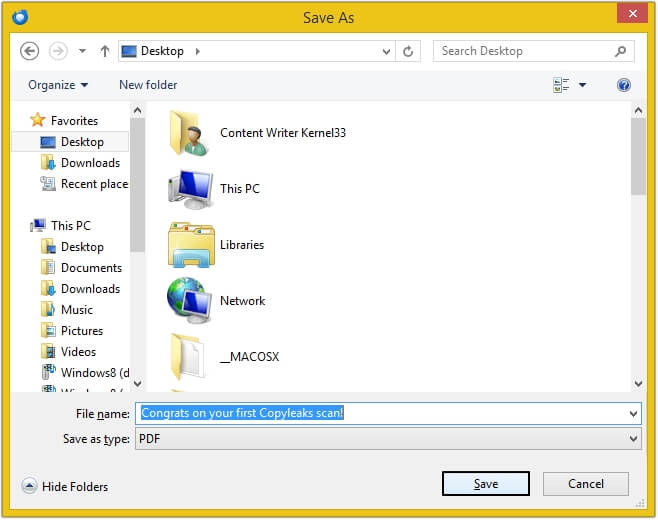
Limitations of converting a single Thunderbird email to PDF
- The process needs to be repeated until you save all the required emails.
- You can only save one email at a time, which is very time-consuming.
- Lack of email and attachment management makes it unreliable.
Method 2. Convert Thunderbird to PDF (Multiple Emails)
Bulk convert Thunderbird to PDF using an additional plugin in the Thunderbird email client. Here’s how to do so:
Step 1. In Thunderbird, click on the three bars, then select the Add-ons and Themes option from the drop-down list.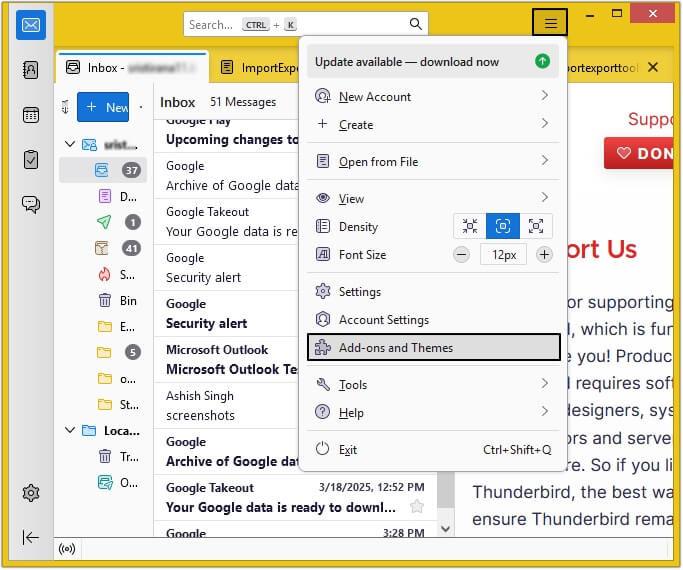
Step 2. Type ImportExportTools NG add-on and hit Enter on the keyboard.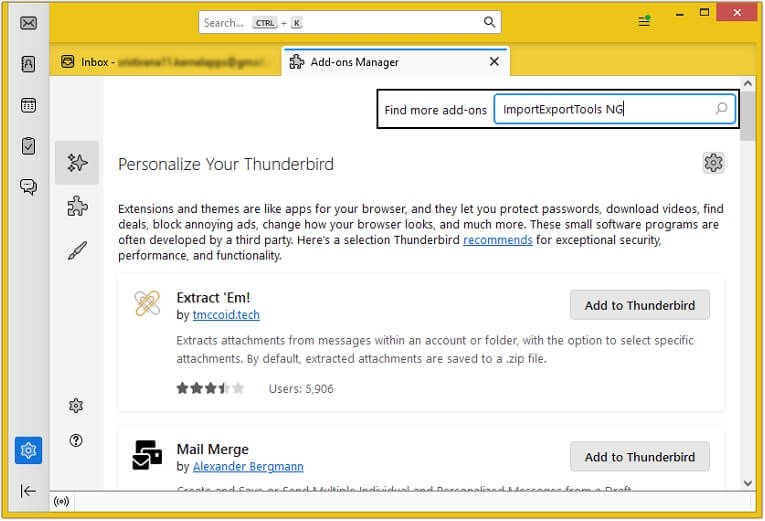
Step 3. Click on the + Add to Thunderbird option to install the plugin in Thunderbird. Once installed, restart Thunderbird.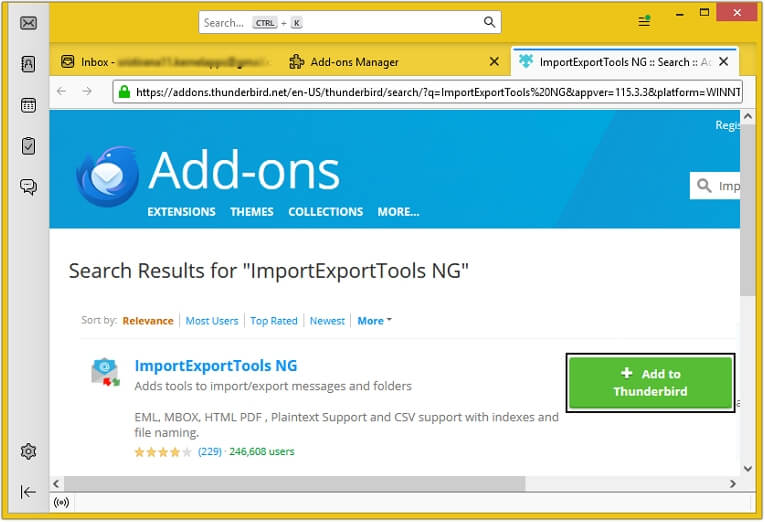
Step 4. Move all the required emails to a folder and right-click on it, then click ImportExportTools NG >Export All Messages In Folder >PDF Format >and select any of the given options as needed.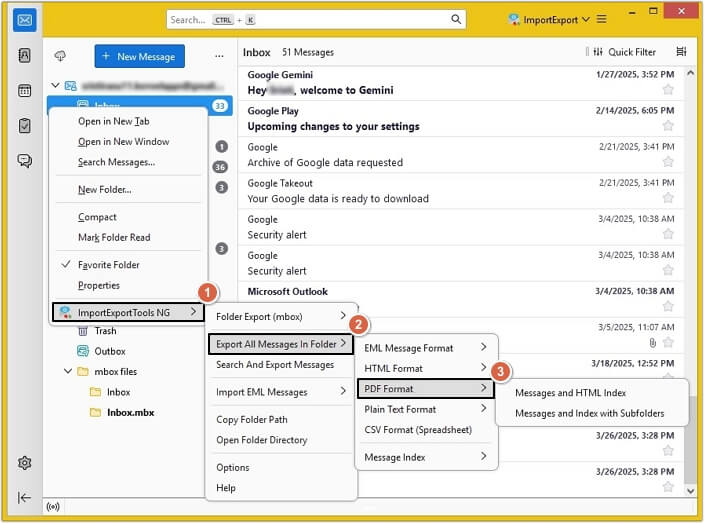
Step 5. Provide the destination and click Select Folder.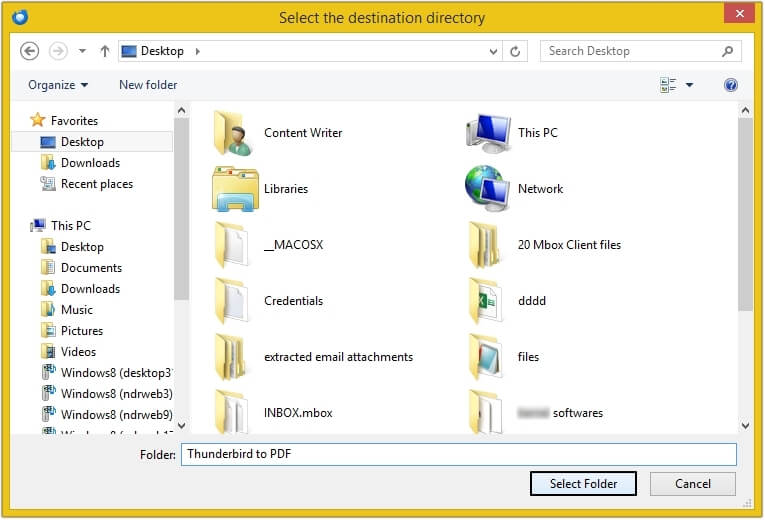
Limitations of converting multiple Thunderbird emails to PDF manually
- Sometimes, the version of Thunderbird you are using may not support the add-on.
- If you have a large MBOX mailbox, then there are chances of process failure.
- The chances of data loss and corruption are very high due to bulk conversion.
- Email formatting and structure might get disturbed while performing the method.
Convert Thunderbird to PDF using an automated tool
After analyzing the manual methods, we can see that they are not entirely reliable and secure. Thus, to perform accurate Thunderbird email conversion, you need to use an automated Thunderbird to PDF Converter tool. And when looking for a trusted tool, EmailXport MBOX Converter stands as the best. This MBOX Converter tool offers various outstanding features and filters that make the entire process smooth and hassle-free.
Benefits offered by the automated Thunderbird to PDF Converter tool:
- Allows you to add the MBOX folder containing multiple files and sub-folders.
- Comes with the Date filter to convert only selective data for better management.
- Three different options to save attachments for enhanced attachments organization.
- Convert MBOX to PDF, MSG, EML, PST, DOC, HTML, and many more formats.
- Provides a detailed MBOX folder preview in a tree-like structure for better understanding.
- Efficiently handles large MBOX folders and converts with complete precision without data loss.
- The trial version allows you to convert 25 items per folder without purchasing the full version.
Conclusion
Manual methods to convert Thunderbird to PDF aren’t the most reliable or efficient approach as they are prone to errors, time-consuming, and may compromise integrity. Instead of these methods, opting for a professional tool like EmailXport MBOX Converter is the best way. This powerful software makes sure quick and accurate conversion while preserving complete data integrity. With this tool, you can also convert MBOX file to PST and other formats for easy data accessibility.
Frequently Asked Questions
A. To convert Thunderbird email to PDF in bulk, you can use third-party Thunderbird to PDF Converter tool for easy and accurate conversion.
A. Yes, our tool preserves the original formatting and attachments during the conversion process, ensuring all emails are converted accurately.
A. With manual methods, the time depends on the amount of data you are transferring. However, third-party MBOX Converter allows you to perform a quick and efficient conversion.